Create and Issue Creds
Things You'll Need:
- Onboarding Fill Out Form
- Onboarding Asana
- LIVE_pluto_partners Airtable
- GCP - create external user
- Google Cloud SDK + GCP Permissions, IAM Access for GCP
- Onboarding Email Template
- Onboarding Metadata Template
- Onboarding Documents, Keeper GCP Creds Permissions
Open the Fill Out Form entering the relevant information from the initial Onboarding Email (Partner, Platform, Region, Tier). This creates a pre-made Asana task for you.
In the LIVE_pluto_partners Grid View add a new record inputting:
- id - Partner ID if available
- name - Partner Name
- revised_artwork_reminder - tick
- Region - In initial email if available
- create_hash - tick
Copy the bucket_name eg. fe-euw2-sup-399161641 to the tech-project-notifications filter so when the assets are delivered to us a Slack notification will alert you.
Copy the email addresses to the metadata shares view within LIVE pluto partners.
Once create_hash has been ticked and the clean_name has been created from name the json_payload column will have populated something like the below:
To copy the version without too many apostrophes, when the field is selected hit the space bar and copy from the text box json_payload. Paste this into the lefthand side 'Configure Triggering Event Window' removing the first line break if this copies over.
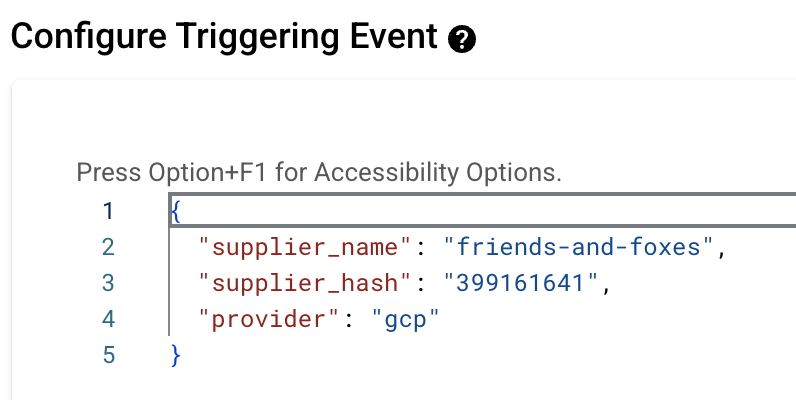
Copy the CLI Test Command (righthand side result) into the Cloud Shell and run within the terminal. This will hopefully give a result of something like the below:
If it errors out use the create external user error guide.
If it does appear copy and paste the bucket, access_key and secret into Keeper and into a Password Link for the email reply.
Grant Access role fooengine-supplier-service-account to the service account you've created within IAM Admin.
Make a copy of the 'Empty Sheet to Copy Metadata Template' editing the sheet name to match the partner you're onboarding. Share with the relevant email addresses from the initial onboarding email and copy the link into the following Onboarding Email Template.
Edit the Onboarding Email Template ensuring to replace the bucket, password link, test file information depending on territory and the metadata gsheet link. Attach the example series artwork of the Paramount title Yellowstone as well as the compatible bucket clients PDF (both files are below). When you're confident the template email is ready hit send!